Bring your book with you.
Your clients and their balances come across in an afternoon. Nobody starts from zero, and nothing goes live until the total matches your own books.
- 1Upload your list
An Excel sheet, a CSV, or an export from the app you use now. Paper cards? We’ll help you type them up.
- 2Check every row
Rype points out wrong phone numbers, duplicates and missing names before anything is saved.
- 3Match your books
You type the total from your own books. Rype only continues when it matches to the pesewa.
- 4Go live
Each client gets a text with their balance, so a wrong figure is spotted the same day.
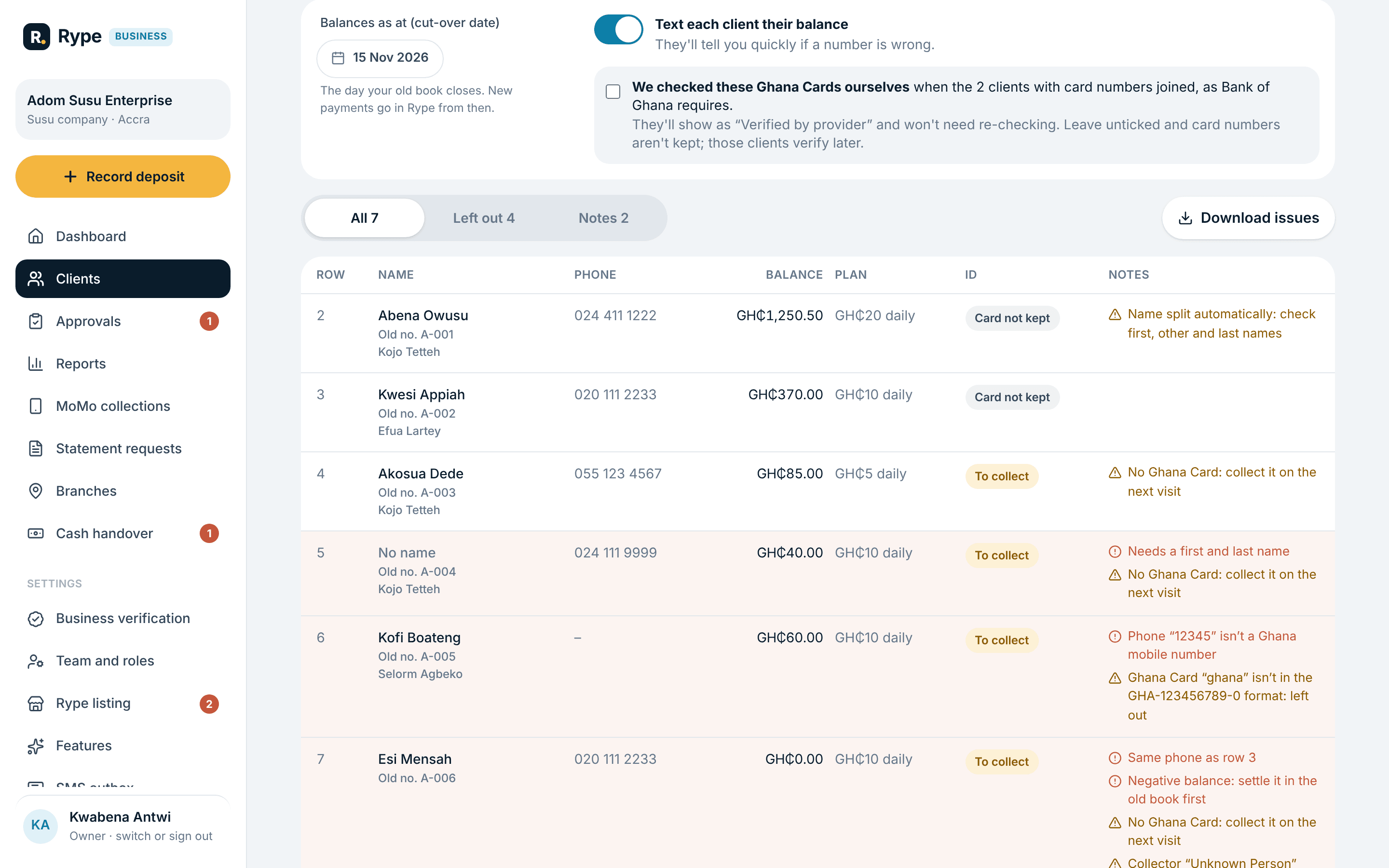
Every row is checked before anything is saved. Rows with problems are listed so you can fix them in your file.
Questions people ask before switching.
Do my clients have to re-verify?
No. If you checked their Ghana Cards when they joined, you confirm that once during the import. Clients you never checked can be verified on the next visit.
What about the history?
Each client starts with a balance brought forward as at the date you pick. Your old book stays the record for anything before that day.
What if I make a mistake?
Until the first payment is recorded for those clients, you can undo the whole import and try again. The attempt stays in your import history.
Paper cards? We’ll help.
Rype’s team can type up your passbooks with you and check every balance before you go live.